<?xml version="1.0" encoding="utf-8"?><feed xmlns="http://www.w3.org/2005/Atom" ><generator uri="https://jekyllrb.com/" version="4.3.3">Jekyll</generator><link href="http://0.0.0.0:4000/feed.xml" rel="self" type="application/atom+xml" /><link href="http://0.0.0.0:4000/" rel="alternate" type="text/html" /><updated>2025-10-07T15:13:33+00:00</updated><id>http://0.0.0.0:4000/feed.xml</id><title type="html">DevBlog</title><subtitle>stuff and nonsense</subtitle><author><name>Simon Owen</name></author><entry><title type="html">Sprite Code Generator</title><link href="http://0.0.0.0:4000/blog/2020/05/04/tile2sam-code/" rel="alternate" type="text/html" title="Sprite Code Generator" /><published>2020-05-04T12:00:00+00:00</published><updated>2020-05-04T12:00:00+00:00</updated><id>http://0.0.0.0:4000/blog/2020/05/04/tile2sam-code</id><content type="html" xml:base="http://0.0.0.0:4000/blog/2020/05/04/tile2sam-code/"><![CDATA[<p>I’ve been enhancing <a href="https://github.com/simonowen/tile2sam/">tile2sam</a> to output Z80 code as an alternative to raw image data. I wanted single-purpose sprite-specific routines that are competitive with hand-optimised code for the same task.</p>

<p>General purpose routines are convenient but also relatively inefficient. SAM has plenty of RAM, so why not trade some of it for fast code tailored to each use?</p>

<p>I’m targetting SAM’s MODE 4 for now, which is 4 bits per pixel. I’ve also started with the simplest case of full unclipped routines, which must not overlap the screen edges. More complex cases (including edge clipping and block masking) may be added in the future.</p>

<hr />

<h2 id="improvements">Improvements</h2>

<p>There are a number of wasteful areas in general purpose routines that can be improved by custom code generation:</p>

<h3 id="1-background-drawing">1) Background drawing</h3>

<p>This is probably the biggest loss in traditional routines. They draw a full rectangular area since they have no knowledge of the content. Drawing a solid rectangle takes just as long as a sprite containing a single set pixel. Attempting to adapt to the content can improve the best-case times, but usually at the cost of slower worst-case.</p>

<p>Generated code can completely ignore background regions and mask only known partial bytes (where only one pixel of a byte pair is used). If masking isn’t required the display data can be written directly, saving even more time.</p>

<h3 id="2-data-fetches">2) Data fetches</h3>

<p>Too much time is spent fetching data from memory and advancing pointers. Each byte fetched will typically involve <code class="language-plaintext highlighter-rouge">LD A,(DE)</code> [12T] followed by <code class="language-plaintext highlighter-rouge">INC DE</code> [~8T] (or <code class="language-plaintext highlighter-rouge">INC E</code> [4T], if the source data alignment can be guaranteed). Masked drawing is worse as we must fetch two additional bytes — the mask value and the current display byte to mask.</p>

<p>Reading a data byte as an immediate value is faster than an explicit memory fetch, and doesn’t require a register pair pointer or pointer advance. Using <code class="language-plaintext highlighter-rouge">LD (HL),n</code> [16T] to write a byte is faster than fetching the byte above and advancing the pointer, so we’re already saving time. Masked drawing has similar gains, with immediate values used for <code class="language-plaintext highlighter-rouge">AND n; OR n</code>.</p>

<p>If the same immediate value is used multiple times it’s better to load it into a spare register with <code class="language-plaintext highlighter-rouge">LD r,n</code> [8T] and use the register version of the instruction. That means using <code class="language-plaintext highlighter-rouge">LD (HL),r</code> [12T] instead of <code class="language-plaintext highlighter-rouge">LD (HL),n</code> [16T]. Using the same immediate value twice gains back the overhead of loading the register with a value, and for each additional use we save 4T. Once two different values are needed we can save a further 4T by loading them both into a register pair with <code class="language-plaintext highlighter-rouge">LD rr,nn</code> [12T]. With two spare register pairs we can cache up to 4 values for fast access.</p>

<p>Generated code can pre-cache common values in spare registers, and use them in place of immediate values. More on this later.</p>

<h3 id="3-display-navigation">3) Display navigation</h3>

<p>There’s no need to move the display pointer to unused/background areas of the sprite. If a sprite consists of only two pixels, at the top left and bottom right, the display pointer should be moved only once, at the point the second display byte is ready to write.</p>

<p>The instructions used to change the display pointer depend on how far it’s being moved, whether 8-bit carry is required, and if there are any free register pairs. Offsets up to 4 bytes are fastest using <code class="language-plaintext highlighter-rouge">INC r</code> [4T each]. Larger offsets without carry are faster using a sequence of <code class="language-plaintext highlighter-rouge">LD A,L; ADD A,n; LD L,A</code> [16T] or <code class="language-plaintext highlighter-rouge">LD A,L; SUB n; LD L,A</code> [16T], depending on the direction.</p>

<p>Changing from even/odd to odd/even lines may require carry into the high byte. To do that the previous instruction sequences must be followed by <code class="language-plaintext highlighter-rouge">ADC A,H; SUB L; LD H,A</code> [+12T] or <code class="language-plaintext highlighter-rouge">LD A,H; SBC A,0; LD H,A</code> [+16T], respectively. Alternatively, if a spare register pair is available we can perform the entire adjustment with <code class="language-plaintext highlighter-rouge">LD rr,nn; ADD HL,rr</code> [20T], saving 8-12T over the 8-bit versions. Negative offsets should still use <code class="language-plaintext highlighter-rouge">ADD HL,rr</code> to avoid needing to know the carry state for <code class="language-plaintext highlighter-rouge">SBC HL,rr</code>.</p>

<p>The generated code can avoid all unnecessary movement and recognise the best method to move the pointer for each situation (very few situations <em>require</em> carry).</p>

<h3 id="4-drawing-order">4) Drawing order</h3>

<p>At 128 bytes per line for MODE 4, moving to the next line down requires adding ~128 and carrying any overflow. It’s usually slightly less as we’ll want to move back to the left edge. However, there’s we don’t <em>need</em> to draw in line order, as long as the final result is the same.</p>

<p>Adding 256 to the display pointer advances two display lines and requires only an <code class="language-plaintext highlighter-rouge">INC H</code> [4T], and no carry. Rather than moving back to the start of the next line it’s more efficient if we stay in the same horizontal position and draw the next line in the opposite direction. If the sprite has near vertical edges, we will be close to the correct horizontal position for the next line.</p>

<p>Generated code can draw even lines of the sprite in a downwards direction then odd lines in an upwards direction, moving right and left in a zig-zag pattern. This both simplifies pointer adjustment code and saves time.</p>

<p>The switch from even to odd lines is +/-128 bytes, depending on whether the sprite has an even/odd height. The even-odd switch may require overflow/underflow, depending on whether we started drawing at an even or odd y position. We versions of the code for even or odd y positions, but the code to decide which to use would be slower than always carrying!</p>

<p>We need just a single drawing routine for any y position. Shifts in x position still requires separate routines as the data values (and mask positions/values) will be different.</p>

<hr />

<h2 id="value-caching">Value caching</h2>

<p>The drawing method described above uses only <strong>HL</strong> for the display pointer, leaving <strong>BC</strong> and <strong>DE</strong> free for quick-access cache values. Deciding which data values to cache in registers has been one of the more challenging parts of this project. Anywhere an immediate value is used could potentially be replaced by a register to save 4T. This applies to the image and mask data, the offsets to move around the display, and even the literal 0 in <code class="language-plaintext highlighter-rouge">SBC A,0</code> to carry 8-bit underflow. The values and the order they’re needed is constant for a given routine, and it’s this value stream that we optimise for register caching.</p>

<p>I started with a naive approach of counting the frequency of values, and only caching the most common. This does help, but if there are many different repeated values there is inevitable waste. This was improved by changing the cache when it contained values that were no longer needed. However it could still be fooled into caching a single occurrence of the value early in the stream, unnecessarily hogging a register.</p>

<p>My current approach uses a MRU list to track the values seen and their frequency. This gives a window that monitors the current value needs, which can change as we move through the image. Once there are enough recent values with a frequency &gt;= 2 they’re ready to be assigned to the cache.</p>

<p>Each time a new cache set is generated any differences from the current cache values are applied. The frequency of all values seen before the cache point are cleared, since they no longer candidates — this avoids spread out values hogging registers. Values already in the cache also retain their original register assignments, to minimise the code needed to update them. If more than 2 values are to be updated, and a spare cache register pair is available, they’ll be assigned as a pair.</p>

<p>At the point of use, values are fetched from the pre-processed value stream. It returns either a literal value or the register containing the value, which is used as the operand of the instruction being generated. The value stream also appends any <code class="language-plaintext highlighter-rouge">LD</code> instructions needed to update the cache registers before their use.</p>

<hr />

<h2 id="additional-routines">Additional Routines</h2>

<p>As well as drawing sprites we need to be able to remove them from the screen. If we’re using masked drawing we’ll probably want to save and restore the display under the sprite. If we’re using unmasked drawing the background is usually blank, so we can just draw the background colour over the sprite to remove it.</p>

<p>There are also different approaches to drawing/saving/restoring/clearing, which depend on the size, shape and complexity of the sprite. Rather than always using the same code it makes sense to generate all available options for the task and use the fastest. Memory poke and stack methods each have their strengths, and the choice may not be as clear-cut as you think!</p>

<p>I’ve implemented a selection of starter routines for unclipped drawing. They can be tweaked if improvements are found, and additional routines can be added for different techniques or features. They share the same display pointer adjustment logic and can use value caching where appropriate. This reduces the amount of routine-specific code needed for each function.</p>

<hr />

<h2 id="starter-routines">Starter Routines</h2>

<h3 id="unmasked-drawing-poke">Unmasked drawing (poke)</h3>

<p>Data is written to the display using <code class="language-plaintext highlighter-rouge">LD (HL),r</code> or <code class="language-plaintext highlighter-rouge">LD (HL),n</code>, depending on whether the value is available in a cache register.</p>

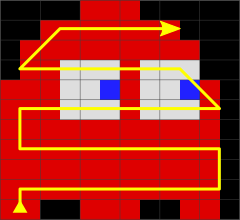
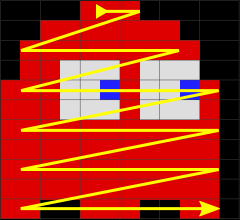
<p>Even lines are written downwards then odd lines upwards, both in a zig-zag pattern:</p>

<p><img src="/blog/content/2020/05/ghost_even_zigzag.png" alt="Even Lines" class="img-responsive" /> 
<img src="/blog/content/2020/05/ghost_odd_zigzag.png" alt="Odd Lines" class="img-responsive" /></p>

<h3 id="masked-drawing-poke">Masked drawing (poke)</h3>

<p>As above but partial display bytes are masked using <code class="language-plaintext highlighter-rouge">AND (HL)</code> to preserve the other display pixel, before the other pixel is merged using <code class="language-plaintext highlighter-rouge">OR r</code> or <code class="language-plaintext highlighter-rouge">OR n</code>. This gives pixel-perfect drawing over any background image.</p>

<h3 id="save-peek-then-push">Save (peek then push)</h3>

<p>Display navigation as above but data is read from the display using <code class="language-plaintext highlighter-rouge">LD E,(HL)</code> and <code class="language-plaintext highlighter-rouge">LD D,(HL)</code>, then pushed to a sprite-specific buffer using <code class="language-plaintext highlighter-rouge">PUSH DE</code>.</p>

<p>Saving covers display data affected by both even and odd x positions, which will usually be very similar. This avoids the need for separate even/odd routines for saving/restoring.</p>

<h3 id="restore-pop-then-poke">Restore (pop then poke)</h3>

<p>The reverse of saving above. <code class="language-plaintext highlighter-rouge">POP DE</code> retrieves saved data, which is written back to the display using <code class="language-plaintext highlighter-rouge">LD (HL),D</code> and <code class="language-plaintext highlighter-rouge">LD (HL),E</code>.</p>

<p>Since the stacked data is removed in reverse order we must also navigate the display in reverse order. Care also needs to be taken to skip the first byte if the total number of bytes saved was odd.</p>

<h3 id="save-ldi">Save (LDI)</h3>

<p>Copy data from display to save buffer using <code class="language-plaintext highlighter-rouge">LDI</code> [20T per byte], skipping any unused source areas.</p>

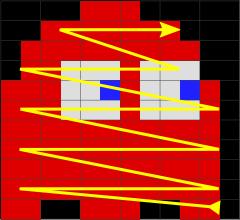
<p>Automatic <strong>HL</strong> and <strong>DE</strong> advancing prevents us zig-zagging, so lines are saved in left-to-right order. We still copy even lines downwards then odd lines upwards:</p>

<p><img src="/blog/content/2020/05/ghost_even_ltor.png" alt="Even Lines" class="img-responsive" />
<img src="/blog/content/2020/05/ghost_odd_ltor.png" alt="Odd Lines" class="img-responsive" /></p>

<h3 id="restore-ldi">Restore (LDI)</h3>

<p>As above but using <strong>HL</strong> for the save buffer pointer and <strong>DE</strong> for the display pointer.</p>

<h3 id="clear-poke">Clear (poke)</h3>

<p>The same as unmasked drawing, but always writing a zero byte for image data. The minimal use of cache registers leaves <strong>DE</strong> free for a faster switch between even and odd lines.</p>

<p>I originally had a custom routine that used <code class="language-plaintext highlighter-rouge">LD (HL),A</code> to clear, with an initial <code class="language-plaintext highlighter-rouge">XOR A</code>. It only saved 4T over what the draw routine generates, and only when navigating within the sprite didn’t need <strong>A</strong> for non-carry pointer changes. I didn’t feel it was worth keeping for such a small gain.</p>

<h3 id="clear-stack">Clear (stack)</h3>

<p>Navigate to the last used byte on each used line, then use <code class="language-plaintext highlighter-rouge">LD SP,HL</code> to set up the stack, <code class="language-plaintext highlighter-rouge">PUSH DE</code> is used to clear back to the first used pixel on each line.</p>

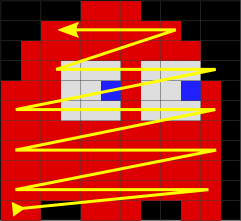
<p>If the line contains an odd number of pixels the first byte is written using <code class="language-plaintext highlighter-rouge">LD (HL),E</code>, and the rest with the stack. No byte skipping is attempted as <code class="language-plaintext highlighter-rouge">PUSH DE</code> costs the same as moving <strong>SP</strong> back two bytes. We still process even lines down then odd lines up, but work right-to-left:</p>

<p><img src="/blog/content/2020/05/ghost_even_rtol.png" alt="Even Lines" class="img-responsive" />
<img src="/blog/content/2020/05/ghost_odd_rtol.png" alt="Odd Lines" class="img-responsive" /></p>

<h3 id="clear-rect-poke">Clear rect (poke)</h3>

<p>Clear a rectangular area the size of the sprite using <code class="language-plaintext highlighter-rouge">LD (HL),A</code> to write and <code class="language-plaintext highlighter-rouge">XOR A</code> to set the initial zero value. Added only for comparison with sprite-specific code.</p>

<h3 id="clear-rect-stack">Clear rect (stack)</h3>

<p>As above but using <code class="language-plaintext highlighter-rouge">PUSH DE</code> to clear the rectangle. This is one area where the stack approach is generally faster than poking memory.</p>

<hr />

<h2 id="generated-code">Generated Code</h2>

<p>The script output is a Z80 assembly text, with label names generated by combining the function with the sprite names passed to the script. For example, <code class="language-plaintext highlighter-rouge">save_ghost</code> saves the display under the sprite <em>ghost</em>. Missing labels use an auto-generated <code class="language-plaintext highlighter-rouge">spriteN</code> name, where <code class="language-plaintext highlighter-rouge">N</code> is the zero-based index of the tile in the image.</p>

<p>This list shows the available routine prefixes and their register inputs:</p>

<ul>
  <li><code class="language-plaintext highlighter-rouge">masked_</code> - <strong>HL</strong>=sprite coords, with <strong>H</strong>=ypos, <strong>L</strong>=xpos</li>
  <li><code class="language-plaintext highlighter-rouge">unmasked_</code> - <strong>HL</strong>=sprite coords</li>
  <li><code class="language-plaintext highlighter-rouge">save_</code> - <strong>HL</strong>=coords, <strong>DE</strong>=save buffer</li>
  <li><code class="language-plaintext highlighter-rouge">restore_</code> - <strong>HL</strong>=sprite coords, <strong>DE</strong>=save buffer</li>
  <li><code class="language-plaintext highlighter-rouge">clear_</code> - <strong>HL</strong>=sprite coords</li>
  <li><code class="language-plaintext highlighter-rouge">clear_rect_WxH</code> - <strong>HL</strong>=sprite coords</li>
</ul>

<h4 id="notes">Notes:</h4>

<ul>
  <li>all routines use <strong>AF</strong>/<strong>BC</strong>/<strong>DE</strong>/<strong>HL</strong>, leaving <strong>IX</strong>/<strong>IY</strong> and alternate sets untouched.</li>
  <li>the save buffer size is sprite-specific, but I recommend providing the full size in bytes.</li>
  <li><code class="language-plaintext highlighter-rouge">clear_rect_WxH</code> label includes width and height, so generate only one for each size!</li>
</ul>

<hr />

<h2 id="demos">Demos</h2>

<p>I’ve created some demo projects to show basic and typical use cases. Click an image to download a zip containing the demo source, including generated code and bootable disk image.</p>

<h3 id="demo-1">Demo 1</h3>

<p>Simple example drawing and removing a sprite.</p>

<p><a href="/blog/content/2020/05/demo1.zip"><img src="/blog/content/2020/05/demo1.gif" alt="Demo 1" class="img-responsive" /></a></p>

<p>Command-line used:</p>

<div class="language-plaintext highlighter-rouge"><div class="highlight"><pre class="highlight"><code>tile2sam.py sprite.png 11x11 --code masked,save,restore --names ghost --pal --low
</code></pre></div></div>

<p>Here’s what each parameter does:</p>

<ul>
  <li><code class="language-plaintext highlighter-rouge">sprite.png</code> is the input image, in this case containing just a single sprite.</li>
  <li><code class="language-plaintext highlighter-rouge">11x11</code> is the size of the sprite tile.</li>
  <li><code class="language-plaintext highlighter-rouge">--code masked,save,restore</code> generates code for masked drawing and save/restore.</li>
  <li><code class="language-plaintext highlighter-rouge">--names ghost</code> assigns a name to the sprite for code labels.</li>
  <li><code class="language-plaintext highlighter-rouge">--pal</code> writes the palette to <code class="language-plaintext highlighter-rouge">sprite.pal</code>.</li>
  <li><code class="language-plaintext highlighter-rouge">--low</code> generates code targetting the display in low memory at address 0.</li>
</ul>

<p>Output is written to <code class="language-plaintext highlighter-rouge">sprite.asm</code>, matching the image name. Use the <code class="language-plaintext highlighter-rouge">-o</code> option to specify a different file. Adding <code class="language-plaintext highlighter-rouge">-a</code> will append to any existing output file, if you want the output from multiple invocations in one file.</p>

<h3 id="demo-2">Demo 2</h3>

<p>Animate masked sprites over a background image (50Hz).</p>

<p><a href="/blog/content/2020/05/demo2.zip"><img src="/blog/content/2020/05/demo2.gif" alt="Demo 2" class="img-responsive" /></a></p>

<p>Command-line used:</p>

<div class="language-plaintext highlighter-rouge"><div class="highlight"><pre class="highlight"><code>tile2sam.py -q sprites.png 12x11 --code masked,save,restore --names cherry,strawb,orange,bell,apple,grapes,galax,key --pal
</code></pre></div></div>

<p>This breaks down into:</p>

<ul>
  <li><code class="language-plaintext highlighter-rouge">-q</code> supresses the chatty output during code generation.</li>
  <li><code class="language-plaintext highlighter-rouge">sprites.png</code> is the input image containing 8 sprites of the same size.</li>
  <li><code class="language-plaintext highlighter-rouge">12x11</code> is the size of each sprite tile.</li>
  <li><code class="language-plaintext highlighter-rouge">--code masked,save,restore</code> generates code for masked drawing and save/restore.</li>
  <li><code class="language-plaintext highlighter-rouge">--names cherry,strawb,orange,...</code> assigns names to each sprite for code labels.</li>
  <li><code class="language-plaintext highlighter-rouge">--pal</code> writes the palette to <code class="language-plaintext highlighter-rouge">sprites.pal</code>.</li>
</ul>

<h3 id="demo-3">Demo 3</h3>

<p>Animate unmasked sprites over a black background (50Hz).</p>

<p><a href="/blog/content/2020/05/demo3.zip"><img src="/blog/content/2020/05/demo3.gif" alt="Demo 3" class="img-responsive" /></a></p>

<p>Command-line used:</p>

<div class="language-plaintext highlighter-rouge"><div class="highlight"><pre class="highlight"><code>tile2sam.py -q sprites.png 12x11 --code unmasked,clear --names cherry,strawb,orange,bell,apple,grapes,galax,key --pal
</code></pre></div></div>

<p>Clearing the sprites is much faster than save/restore, allowing us to draw twice as many.</p>

<h2 id="source-code">Source Code</h2>

<p>You can find the updated tile2sam.py script and demo source code on the <a href="https://github.com/simonowen/tile2sam/">tile2sam</a> project page. You’ll need Python 3.6 or later and <a href="https://github.com/simonowen/pyz80/">pyz80</a> in your path to assemble the output to a disk image.</p>

<p>Please let me know if you encounter any issues or have trouble using it. I’m also open to feature requests for future versions.</p>

<p>Special thanks to Chris Pile for his feedback during development.</p>]]></content><author><name>Simon</name></author><category term="tile2sam" /><category term="SAM Coupe" /><category term="Z80" /><summary type="html"><![CDATA[I’ve been enhancing tile2sam to output Z80 code as an alternative to raw image data. I wanted single-purpose sprite-specific routines that are competitive with hand-optimised code for the same task.]]></summary></entry><entry><title type="html">SAMdiskHelper</title><link href="http://0.0.0.0:4000/blog/2015/03/09/samdiskhelper/" rel="alternate" type="text/html" title="SAMdiskHelper" /><published>2015-03-09T21:45:49+00:00</published><updated>2015-03-09T21:45:49+00:00</updated><id>http://0.0.0.0:4000/blog/2015/03/09/samdiskhelper</id><content type="html" xml:base="http://0.0.0.0:4000/blog/2015/03/09/samdiskhelper/"><![CDATA[<p>If you’ve accessed BDOS-format disks in Windows, you’re probably aware of the need to run with Administrator rights. For security reasons, raw disk devices cannot be opened by normal unprivileged users.</p>

<p>Starting with Windows Vista, processes are launched with basic rights, even if the current user is a member of the <em>Administrators</em> group. To run with elevated rights the user must either manually launch a program by right-clicking and selecting “Run as adminstrator”, or the program’s manifest file must request it. Both result in a somewhat jarring <em>User Access Control</em> confirmation prompt before the program is launched.</p>

<p>This is a problem for both <a href="/samdisk/"><em>SAMdisk</em></a> and <a href="http://simcoupe.org"><em>SimCoupe</em></a>, which support BDOS-format disks. Always requesting elevation is not a good option, as raw disk access is currently the only feature that requires elevation. This is where <a href="/sam/samdiskhelper/"><em>SAMdiskHelper</em></a> comes to the rescue. It runs as a service under the <em>SYSTEM</em> user with full access to all disks, and can selectively provide access to them. The one-time installation still requires elevated rights, but after that the accessing program can be run with normal rights.</p>

<p>For safety, only disks with a recognised BDOS or Pro-DOS signature are exposed as read-write through <em>SAMdiskHelper</em>. Other disks are seen as read-only by code-signed versions of <em>SAMdisk</em>, and completely inaccessible to all other programs. These rules do mean that new media cards will not be recognised before they’re formatted, ideally on the real Atom device you intend to share the disk with.</p>

<p>To use <em>SAMdiskHelper</em> you just need to have it installed. Supported versions of <em>SAMdisk</em> (v3.8.3+) and <em>SimCoupe</em> (from May 2014) will use it automatically if needed.</p>

<p>Download it from <a href="/sam/samdiskhelper/">here</a>.</p>]]></content><author><name>Simon</name></author><category term="Release" /><category term="SamDisk" /><category term="SimCoupe" /><category term="Windows" /><summary type="html"><![CDATA[If you’ve accessed BDOS-format disks in Windows, you’re probably aware of the need to run with Administrator rights. For security reasons, raw disk devices cannot be opened by normal unprivileged users.]]></summary></entry><entry><title type="html">TrinLoad v1.0</title><link href="http://0.0.0.0:4000/blog/2015/03/05/trinload-10/" rel="alternate" type="text/html" title="TrinLoad v1.0" /><published>2015-03-05T20:36:06+00:00</published><updated>2015-03-05T20:36:06+00:00</updated><id>http://0.0.0.0:4000/blog/2015/03/05/trinload-10</id><content type="html" xml:base="http://0.0.0.0:4000/blog/2015/03/05/trinload-10/"><![CDATA[<p>Developing <a href="http://www.samcoupe.com/hardtrin.htm" title="Quazar Trinity">Trinity</a>-specific code has typically meant assembling directly on real SAM hardware, or assembling on the PC and transferring the program over to SAM. In my case the latter involved writing the disk image out from <em>pyz80</em> to an SD card using <a href="http://simonowen.com/samdisk" title="SAMdisk"><em>SAMdisk</em></a>, moving the card over to <em>Trinity</em>, rebooting SAM to have the new card recognised, re-selecting the development record, then loading booting or loading the program. Despite the benefits of a familiar PC code editor and faster assembler, the transfer process was still a chore.</p>

<p>I had a similar experience using homebrew code on the <a href="https://en.wikipedia.org/wiki/Dreamcast"><em>Sega Dreamcast</em></a>. The earliest method was to burn content to a CD, but that was terribly slow and wasteful (re-writable CDs didn’t work). Next best was to push code to it over a serial cable, which was better but still became a chore as programs grew in size. The best option was to use the BroadBand Adapter and push code to it over the network. This required booting a helper utility (“dcload-ip”) from CD, which listened for and executed any code sent to it.</p>

<p>Given one of Trinity’s features is an ethernet adapter, it made sense to do something similar for SAM — and so <em><strong>TrinLoad</strong></em> was created!</p>

<p>My initial requirements were:</p>

<ul>
  <li>be discoverable from a desktop PC.</li>
  <li>accept code or data over the network, written to a given page and offset.</li>
  <li>execute from a given page and offset.</li>
  <li>simple implementation on SAM to minimise RAM footprint (and work!).</li>
</ul>

<p>Using a <a href="http://en.wikipedia.org/wiki/User_Datagram_Protocol" title="User Datagram Protocol">UDP</a> broadcast for discovery seemed like a no-brainer. SAM would always be on the same sub-net, and UDP is a simple connectionless protocol to implement. I chose to use UDP port <code class="language-plaintext highlighter-rouge">EDB0</code>, with a single byte payload of “?” as my discovery request. Any listening SAM machines would respond with “!” to indicate their availability. The UDP response would automatically include their IP address for any further communications. As an added bonus I included handlers for ARP who-has and ICMP echo, allowing SAM to respond to pings.</p>

<p><a href="http://en.wikipedia.org/wiki/Transmission_Control_Protocol" title="Transmission Control Protocol">TCP</a> would be the natural choice for reliable data communications, but without a network stack we’d have to implement it ourselves. For that reason I decided to stick with UDP for the data transmission, using the same port as before. Each packet would be ACKed on receipt, to confirm successful delivery, and to act as a transmission throttle so Trinity’s receive buffer didn’t overflow. The data format begins with a 4-byte header: “@” for a type indicator, followed by the target page number, then a 16-bit page offset in little-endian format. This is followed immediately by the data to write to that location. No length is needed as it can be calculated from the UDP data length, minus the 4-byte header. Data transfers average 29K/s, which includes the network receive, copying into place, and ACK.</p>

<p>The longest data block we can transfer in a single packet is 1468 bytes. This is calculated from the ethernet packet data size (1500 bytes), minus headers for IPv4 (20 bytes), UDP (8 bytes), and our data header (4 bytes). Longer blocks must be split into multiple packets, with the client program advancing the offset and page in each one.</p>

<p>After transferring the code we can execute it using a package beginning with &amp;”X”. This is followed by a page number to write to HMPR, and a 16-bit address to start execution. LMPR points to the normal BASIC location, with ROM0 enabled, so you’re free to load small routines at address <code class="language-plaintext highlighter-rouge">0x4000</code> if you want to. The only area to avoid is <code class="language-plaintext highlighter-rouge">0x6000-0x7fff</code>, which is used for <em>TrinLoad</em> code and ethernet buffer. If the calling environment is preserved, returning from your test code will drop back into <em>TrinLoad</em>, ready to receive the next build.</p>

<p>To further streamline the process you can also start <em>TrinLoad</em> automatically on boot-up. This requires special versions of the <em>Trinity</em> flash code and <em>Trinity BDOS</em>, to skip the SD card reporting delay and auto-boot record 1. Then simply add a small auto-boot BASIC program to record 1, to switch to the <em>TrinLoad</em> record and load it. The final piece of the puzzle is an enhanced <em>SAMdisk</em>, with a special <code class="language-plaintext highlighter-rouge">sam:</code> target to find a SAM on the local network and send a binary to it from a disk image. Adding this to an existing <em>pyz80</em> build process makes testing code on real hardware easier than ever.</p>

<p>Potential future uses of the network link:</p>

<ul>
  <li>read and write records on the SD card from the PC.</li>
  <li>dump floppy disks (even custom formats) to a disk image on the PC.</li>
  <li>link to modified TurboMON for single stepping and software breakpoints.</li>
  <li>custom stream for read/write link to the PC from BASIC.</li>
</ul>

<p>A pre-built disk image can be downloaded <a href="/blog/content/2015/03/trinload.zip">here</a>, for use with <em>SAMdisk</em> v3.8.5 or later. Boot this on your real SAM with <em>Trinity</em> attached, then send your <em>pyz80</em> disk image output to it using:</p>
<div class="language-plaintext highlighter-rouge"><div class="highlight"><pre class="highlight"><code>SAMdisk image.dsk sam:
</code></pre></div></div>

<p>The source code for <em>TrinLoad</em> is <a href="https://github.com/simonowen/trinload">available</a> on GitHub.</p>]]></content><author><name>Simon</name></author><category term="Release" /><category term="SAM Coupe" /><category term="SamDisk" /><category term="Trinity" /><summary type="html"><![CDATA[Developing Trinity-specific code has typically meant assembling directly on real SAM hardware, or assembling on the PC and transferring the program over to SAM. In my case the latter involved writing the disk image out from pyz80 to an SD card using SAMdisk, moving the card over to Trinity, rebooting SAM to have the new card recognised, re-selecting the development record, then loading booting or loading the program. Despite the benefits of a familiar PC code editor and faster assembler, the transfer process was still a chore.]]></summary></entry><entry><title type="html">SimCoupe for Raspberry Pi (SDL 2.0)</title><link href="http://0.0.0.0:4000/blog/2014/02/02/simcoupe-raspi-sdl20/" rel="alternate" type="text/html" title="SimCoupe for Raspberry Pi (SDL 2.0)" /><published>2014-02-02T12:58:00+00:00</published><updated>2014-02-02T12:58:00+00:00</updated><id>http://0.0.0.0:4000/blog/2014/02/02/simcoupe-raspi-sdl20</id><content type="html" xml:base="http://0.0.0.0:4000/blog/2014/02/02/simcoupe-raspi-sdl20/"><![CDATA[<p>Previous versions of SimCoupe used SDL 1.2 on the Pi. SDL 1.2 video surfaces are fully implemented in software, typically giving a fixed-size output window without any fancy features such as alpha transparency (well, not at a reasonable speed).</p>

<p>SimCoupe also supported OpenGL though a thin SDL wrapper to give hardware acceleration on many platforms (including Linux and Mac). Unfortunately, the Pi only supports OpenGL ES 2.0 in hardware, so the plain OpenGL implementation fell back on a slow Mesa software implementation. This was slower than the plain SDL 1.2 video surfaces due to SimCoupe’s use of alpha blending for OpenGL scanlines.</p>

<p>I recently added SDL 2.0 support to SimCoupe, to give hardware acceleration support on most platforms, including the Pi. I was hoping to provide updated build instructions for you to make your own, but Rasbian doesn’t yet come with a binary libsdl2 package. You can build that yourself but it has a few extra package dependencies and the build process takes around an hour.</p>

<p>To save time I’m just releasing a pre-built binary package for now. Matching source is available at SourceForge, and if you really want to build it yourself I can help with build instructions. Things should be a lot simpler once Raspbian includes SDL 2.0.</p>

<p>Here’s how to get it:</p>
<div class="language-shell highlighter-rouge"><div class="highlight"><pre class="highlight"><code>wget http://simcoupe.org/files/simcoupi-20140202.zip
unzip simcoupi-20140202.zip
./simcoupe
</code></pre></div></div>

<p>This version has experimental support for vsync, so connecting your Pi to a modern PAL TV with picture processing <em>should</em> give nice smooth scrolling like the original SAM. Most PC monitors are generally fixed at 60Hz, even if you force a 50Hz mode using the <em>hdmi_mode</em> mode setting in <em>config.txt</em> on the Pi, so you probably won’t see any smoothness benefit.</p>

<p>You can run it from the console or under X, but OpenGL ES 2.0 support on the Pi only works in fullscreen mode. If you want to run in a window you’ll need to build with SDL 1.2 instead, which will be used if SDL 2.0 isn’t found. F5 toggles 5:4 mode, F6 toggles smoothing (bilinear filtering), and F7 toggles hi-res scanlines. Those key bindings may change in future versions, but they provide easy access to some of the newer video features.</p>

<p>This is still very much a development version, so there are some known issues:</p>

<ul>
  <li>The video options haven’t yet been updated for the new features.</li>
  <li>Manual speed control supports only 50% and 100%.</li>
  <li>Minor sound glitches on some setups due to vsync.</li>
  <li>Higher than expected sound latency (needs investigation).</li>
</ul>

<p>I’ve only tried it on the current Rasbian release so far, so it may or may not work on other Pi distributions. Please also make sure your system is up-to-date as newer firmware releases can make all the difference. You can do that using:</p>
<div class="language-plaintext highlighter-rouge"><div class="highlight"><pre class="highlight"><code>sudo apt-get update ; sudo apt-get upgrade
</code></pre></div></div>

<p>If keyboard input stops working or you’re experiencing random hangs, please ensure you’re using a compatible Pi power source. Cheap PSUs and USB ports may appear supply enough for basic use, but SimCoupe pushes the Pi harder than most apps and that can expose any weaknesses. A typical sign of this is that you’ll lose network access, which leaves only the red LED lit on the Pi board. Of course, if you don’t have your Pi connected to a network it’s normal to only have just the red LED 😉</p>

<p>I’d welcome any feedback on how well it works (or doesn’t) for you.</p>]]></content><author><name>Simon</name></author><category term="Raspberry Pi" /><category term="SAM Coupe" /><category term="SimCoupe" /><summary type="html"><![CDATA[Previous versions of SimCoupe used SDL 1.2 on the Pi. SDL 1.2 video surfaces are fully implemented in software, typically giving a fixed-size output window without any fancy features such as alpha transparency (well, not at a reasonable speed).]]></summary></entry><entry><title type="html">Spectrum Snapshot Tracing</title><link href="http://0.0.0.0:4000/blog/2012/12/04/spectrum-snapshot-tracing/" rel="alternate" type="text/html" title="Spectrum Snapshot Tracing" /><published>2012-12-04T21:58:55+00:00</published><updated>2012-12-04T21:58:55+00:00</updated><id>http://0.0.0.0:4000/blog/2012/12/04/spectrum-snapshot-tracing</id><content type="html" xml:base="http://0.0.0.0:4000/blog/2012/12/04/spectrum-snapshot-tracing/"><![CDATA[<p>Given a Spectrum snapshot, is it possible to determine which areas are code?</p>

<p>A typical approach would be to modify an emulator to record the location of every instruction executed, and let the snapshot run normally for a while. This gives a guarantee about marked locations, but it’s limited to code that is actually run during the analysis. For a complete picture you need to follow every code path, which would be a challenge even if you made the effort to use every feature and play through every possible outcome of a game. For bulk-processing snapshots it’s even more difficult.</p>

<p>I’ve long wondered whether spidering code was a realistic option. Given a starting point, you recursively follow every possible path, stopping only when you reach a dead-end (<code class="language-plaintext highlighter-rouge">RET</code>) or a previously visited location. It felt pretty straight-forward so I knocked up a quick test program to try it.</p>

<p>The initial approach was simple: follow JP instructions, recursively process <code class="language-plaintext highlighter-rouge">CALL</code>s and conditional jumps, stop at <code class="language-plaintext highlighter-rouge">RET</code>s, and blindly skip over anything else. Skipping instructions requires some opcode filtering, to identify multi-byte instructions with operands and those with CB/ED/DD/FD prefixes. Indexed instructions also need a little extra attention to skip a possible index offset, which aren’t present in the HL version of the same instruction. Despite all that, a while loop, small switch statement, and index flag were enough to cover it.</p>

<p>To track previously visited locations I used a 64K array, shadowing each addressable memory location. The tracing loop marks the array at the current PC offset as it worked, stopping processing if the entry was already marked. For completeness I also mark entries for the operands, so a normal run of code is a contiguous block. Before the program exits it converts the array to a 256x192 image to help visualise the code found, with 1 (green) pixel per byte instruction byte.</p>

<p>The first run was spectacularly short, stopping after only a few instructions when the first <code class="language-plaintext highlighter-rouge">RET</code> was encountered. The problem was that the snapshot was taken at a relatively arbitrary position in the code, not at the top-level entry point. In this case we need to follow the return, taking the return address from the stack. If the parent routine also returned, we’d need to do the same thing again for the next value on the stack. That meant tracking changes to the stack pointer to ensure it was at the correct position for further returns.</p>

<p>Related to this, what if there was data on the stack at the time of the snapshot? The <code class="language-plaintext highlighter-rouge">RET</code> would pick that up instead, and it’s likely we’d start tracing a non-code location. To fix that we must process <code class="language-plaintext highlighter-rouge">PUSH</code> and <code class="language-plaintext highlighter-rouge">POP</code> instructions too, and adjust the SP value appropriately. <code class="language-plaintext highlighter-rouge">INC SP</code>/<code class="language-plaintext highlighter-rouge">DEC SP</code> also needed similar treatment. At this point I was starting to worry the code was turning into an emulator!</p>

<p>Of course, returning with data on the stack is still a valid thing to do in some cases. Unfortunately it’s a dynamic value that isn’t known to our static tracing, so the only option is to stop the trace path. Similarly, <code class="language-plaintext highlighter-rouge">JP (HL)</code> and friends are also treated as unknown dynamic targets. These are most likely to be used for jump-table lookups, and are probably the biggest limitation with static tracing.</p>

<p>This leads on to the problem of mixing code and data. <code class="language-plaintext highlighter-rouge">RST 08</code> in the Spectrum ROM is followed by a single byte for an error code, which is picked up inside the routine by popping the return address, or using <code class="language-plaintext highlighter-rouge">EX (SP),HL</code>. Some games also use the same technique to inline data after a <code class="language-plaintext highlighter-rouge">CALL</code>. Under normal circumstances we trace both the called routine and the path beyond the <code class="language-plaintext highlighter-rouge">CALL</code>, but this would lead us to trace the trailing data, with unpredictable results. Fortunately, the stack tracking comes to the rescue here, allowing us to detect this as a stack underflow condition. We can’t determine how much data is present, but we can stop the parent trace continuing.</p>

<p>There’s a further complication to this issue. If a different part of the code calls the same routine, it would be skipped as a previously visited location before the stack underflow caught the data access, and would continue into the data. To fix this I added another marker array to allow called locations to be blacklisted, so future calls to the same code is stopped at the call.</p>

<p>Also connected to this is the technique used to discard return addresses from within a routine, usually by simply popping them off the stack. This also looks like an attempt to access data on the stack, and triggers call blacklisting. As a work-around I attempt to recognise code signatures for data access, including <code class="language-plaintext highlighter-rouge">POP ss ; LD r,(ss)</code>. This is likely to need further improvement as other examples are found.</p>

<p>To help detect tracing escaping genuine code I’ve added some diagnostics tests: If tracing encounters a block of 4 or more <code class="language-plaintext highlighter-rouge">NOP</code>s in RAM, it suspects the trace has run into open memory. If an inert <code class="language-plaintext highlighter-rouge">LD r,r</code> instruction is encountered it suspects unwanted data tracing. In both cases it displays a warning message and stops the current trace thread, so they can be investigated.</p>

<p>Sometimes even the PC value in the snapshot isn’t enough as a starting point. One of the earlier snapshots I tried was Manic Miner, which sits at a <em>PAUSE 0</em> after loading, requiring a key press to start the game. This is a problem because there’s no code-only path into the game, due to the start location being encoded as data in the BASIC statements. If the PC trace gives no result in RAM, I fall back looking up the PROG system variable, and if it’s pointing in roughly the correct location I scan the basic listing for USR statements. Whenever a <em>USR n</em> or a <em>USR VAL n$</em> is found the address is traced as a new entry point. Code traced from a USR statement is shown in red, with overlapping locations using additive colour mixing to give yellow.</p>

<p>Another entry point option is the interrupt handler. The IM 1 handler is of little interest as it’s completely self-contained, but if the snapshot indicates IM 2 we can determine the handler address and call it as another possible entry point. Code traced from the IM 2 handler is shown in blue, with colour mixing as before.</p>

<p>Static tracing is only suitable for 48K snapshots, as paging may require dynamically calculated values to identify both ports and pages. In many cases 128K games only use the extra memory for music or level data, so I don’t see it as a huge problem. A bigger issue is that it requires snapshots, and most archived software is preserved in tape format. However, generating snapshots from tape images is a a trivial task for a modified emulator.</p>

<p>Both static and dynamic tracing have their uses, and a combination of both will be the killer solution. Perhaps dynamic tracing to feel the bones of a program, and static tracing to flesh out the bits that can’t be reached? In some cases dynamic tracing may even be able to determine how to reach areas that weren’t visit on a first run, particularly if decisions are based on keyboard input. It could also help solve the ambiguous cases where static tracing isn’t sure what the code is doing.</p>

<p>Here’s the output from tracing a snapshot of a freshly loaded Dynamite Dan II:</p>
<div class="language-plaintext highlighter-rouge"><div class="highlight"><pre class="highlight"><code>dd2.szx: PC=03D6 SP=5E05 I=3F IM=1
8155: return address popped
714D: return address popped
Traced 7195 code bytes in RAM.
</code></pre></div></div>

<p>And the trace image it produced:</p>

<p><img src="/blog/content/2012/12/dd2.png" alt="Memory Map" class="img-responsive" /></p>

<p>If you’d like to take a closer look, and maybe even improve on what I’ve done so far, the source code is now <a href="https://github.com/simonowen/snaptrace" title="snaptrace">available on GitHub</a>.</p>]]></content><author><name>Simon</name></author><category term="Release" /><category term="Spectrum" /><summary type="html"><![CDATA[Given a Spectrum snapshot, is it possible to determine which areas are code?]]></summary></entry><entry><title type="html">SimCoupe for Rasbian</title><link href="http://0.0.0.0:4000/blog/2012/08/02/simcoupe-for-rasbian/" rel="alternate" type="text/html" title="SimCoupe for Rasbian" /><published>2012-08-02T12:34:34+00:00</published><updated>2012-08-02T12:34:34+00:00</updated><id>http://0.0.0.0:4000/blog/2012/08/02/simcoupe-for-rasbian</id><content type="html" xml:base="http://0.0.0.0:4000/blog/2012/08/02/simcoupe-for-rasbian/"><![CDATA[<p><em>Rasbian</em> is the new OS recommendation for the <a href="http://en.wikipedia.org/wiki/Raspberry_Pi">Raspberry Pi</a>. It’s slightly better configured than the previous Debian “squeeze” image, with fewer steps needed to build <a href="http://simcoupe.org/" title="SimCoupe Homepage">SimCoupe</a>.</p>

<p>Here’s an update to my <a href="/blog/2012/05/07/simcoupe-raspberry-pi/" title="SimCoupe for Raspberry Pi">previous instructions</a>, plus a new binary:</p>

<h3 id="system-requirements">System Requirements</h3>

<ul>
  <li>Raspberry Pi board.</li>
  <li>Rasbian “wheezy” (<a href="http://www.raspberrypi.org/downloads">2012-07-15-wheezy-raspbian</a>) written to SD card.</li>
  <li>Network connection for software downloads.</li>
</ul>

<h3 id="building-from-source">Building From Source</h3>

<p>Install the SDL development library and source control tool (about 40MB):</p>
<div class="language-shell highlighter-rouge"><div class="highlight"><pre class="highlight"><code><span class="nb">sudo </span>apt-get <span class="nb">install </span>libsdl1.2-dev subversion
</code></pre></div></div>

<p>Fetch the SimCoupe source code:</p>
<div class="language-shell highlighter-rouge"><div class="highlight"><pre class="highlight"><code>svn co http://simcoupe.svn.sf.net/svnroot/simcoupe/trunk/SimCoupe@1439
</code></pre></div></div>

<p>It’ll take around 20 seconds before the files begin downloading.</p>

<p>Then compile the code:</p>
<div class="language-shell highlighter-rouge"><div class="highlight"><pre class="highlight"><code><span class="nb">cd </span>SimCoupe/SDL <span class="o">&amp;&amp;</span> make
</code></pre></div></div>

<p>After about 10 minutes you’ll be ready to launch SimCoupe:</p>
<div class="language-shell highlighter-rouge"><div class="highlight"><pre class="highlight"><code>./simcoupe
</code></pre></div></div>

<p>Simples!</p>

<h3 id="binary-download">Binary Download</h3>

<p>Here’s one I made earlier:</p>
<div class="language-shell highlighter-rouge"><div class="highlight"><pre class="highlight"><code>wget http://simcoupe.org/files/simcoupi-r1439.zip
unzip simcoupi-r1439.zip
./simcoupe
</code></pre></div></div>]]></content><author><name>Simon</name></author><category term="Raspberry Pi" /><category term="SAM Coupe" /><category term="SimCoupe" /><summary type="html"><![CDATA[Rasbian is the new OS recommendation for the Raspberry Pi. It’s slightly better configured than the previous Debian “squeeze” image, with fewer steps needed to build SimCoupe.]]></summary></entry><entry><title type="html">SimCoupe for Raspberry Pi</title><link href="http://0.0.0.0:4000/blog/2012/05/07/simcoupe-raspberry-pi/" rel="alternate" type="text/html" title="SimCoupe for Raspberry Pi" /><published>2012-05-07T03:23:53+00:00</published><updated>2012-05-07T03:23:53+00:00</updated><id>http://0.0.0.0:4000/blog/2012/05/07/simcoupe-raspberry-pi</id><content type="html" xml:base="http://0.0.0.0:4000/blog/2012/05/07/simcoupe-raspberry-pi/"><![CDATA[<p><a href="http://en.wikipedia.org/wiki/Raspberry_Pi">Raspberry Pi</a> boards are starting to reach more end users, so it seems like a good time to cover what’s needed to get <a href="http://simcoupe.org">SimCoupe</a> running on it.</p>

<p>The instructions below will lead you through downloading and building SimCoupe on the Pi itself. If you’d prefer to download a ready-to-run binary, skip to the end.</p>

<h3 id="system-requirements">System Requirements</h3>

<ul>
  <li>Raspberry Pi board (or QEMU ARM setup).</li>
  <li>Debian “squeeze” (<a href="http://www.raspberrypi.org/downloads">debian6-19-04-2012</a>) image written to SD card.</li>
  <li>Network connection for software downloads.</li>
</ul>

<h3 id="building-from-source">Building From Source</h3>

<p>As a first step we add the <em>pi</em> user to the video group, so it has permission to use the framebuffer device (/dev/fb0). This is needed to run SimCoupe from the console:</p>
<div class="language-shell highlighter-rouge"><div class="highlight"><pre class="highlight"><code><span class="nb">sudo </span>usermod <span class="nt">-a</span> <span class="nt">-G</span> video pi
</code></pre></div></div>

<p>For this to take effect you’ll need to log out and back in again:</p>
<div class="language-shell highlighter-rouge"><div class="highlight"><pre class="highlight"><code><span class="nb">exit</span>
</code></pre></div></div>

<p>The Debian image includes most of the development tools, but we need some additional libraries, and SubVersion:</p>
<div class="language-shell highlighter-rouge"><div class="highlight"><pre class="highlight"><code><span class="nb">sudo </span>apt-get <span class="nb">install </span>libsdl-dev libz-dev subversion
</code></pre></div></div>

<p>Press Enter when prompted to confirm the downloads (around 22MB). It’ll take a couple of minutes to install them once the downloads complete.</p>

<p>Next we fetch the SimCoupe source code:</p>
<div class="language-shell highlighter-rouge"><div class="highlight"><pre class="highlight"><code>svn co https://simcoupe.svn.sourceforge.net/svnroot/simcoupe/trunk/SimCoupe@1413
</code></pre></div></div>

<p>This will appear to do nothing for around 20 seconds as it determines the list of files to download, so please be patient. The @1413 suffix selects a specific code revision known to work on the Pi. You can remove this suffix to download latest revision, but there may be additional building requirements.</p>

<p>We’re now ready to compile the code using:</p>
<div class="language-shell highlighter-rouge"><div class="highlight"><pre class="highlight"><code><span class="nb">cd </span>SimCoupe/SDL
make
</code></pre></div></div>

<p>This will take about 8 minutes, so go make yourself a cup of tea.</p>

<p>Once that completes you should have a binary ready to be launched using:</p>
<div class="language-shell highlighter-rouge"><div class="highlight"><pre class="highlight"><code>./simcoupe
</code></pre></div></div>

<p>Before you do that, let’s download a SAM game demo to play:</p>
<div class="language-shell highlighter-rouge"><div class="highlight"><pre class="highlight"><code>wget http://tinyurl.com/manicmdemo
</code></pre></div></div>

<p>As a final step we’ll load the ALSA sound driver for Pi audio support, which isn’t enabled by default. You’ll need to run this on every boot, unless you add it to the system startup scripts:</p>
<div class="language-shell highlighter-rouge"><div class="highlight"><pre class="highlight"><code><span class="nb">sudo </span>modprobe snd_bcm2835
</code></pre></div></div>

<p>The sound driver is still under active development and considered alpha quality. It’s more stable than the previous release but CPU usage is still a bit high side, which may interfere with SimCoupe. Future Debian releases should include an updated driver.</p>

<p>To launch SimCoupe and boot the <em>Manic Miner</em> demo use:</p>
<div class="language-shell highlighter-rouge"><div class="highlight"><pre class="highlight"><code>./simcoupe ManicMinerDemo.zip
</code></pre></div></div>

<h3 id="binary-download">Binary Download</h3>

<p>Here’s one I made earlier:</p>
<div class="language-shell highlighter-rouge"><div class="highlight"><pre class="highlight"><code>wget http://simcoupe.org/files/simcoupi-r1413.zip
unzip simcoupi-r1413.zip
./simcoupe
</code></pre></div></div>

<h3 id="known-issues">Known Issues</h3>

<p>It sometimes takes 10 seconds to close the ALSA audio device. This delay may be experienced when quitting the emulator (Ctrl-F12), or after changing sound settings in the SimCoupe options (F10). Hopefully a future driver update will fix this issue.</p>

<h3 id="todo">ToDo</h3>

<p>SimCoupe does not yet take full advantage of the Pi hardware. A future release will use OpenGL ES for hardware accelerated stretching and alpha blending. Using a 50Hz/PAL display mode and vsync should also allow perfectly smooth scrolling, with audio scaled slightly to match.</p>]]></content><author><name>Simon</name></author><category term="Raspberry Pi" /><category term="SAM Coupe" /><category term="SimCoupe" /><summary type="html"><![CDATA[Raspberry Pi boards are starting to reach more end users, so it seems like a good time to cover what’s needed to get SimCoupe running on it.]]></summary></entry><entry><title type="html">Spectrum Pac-Man</title><link href="http://0.0.0.0:4000/blog/2012/01/19/spectrum-pac-man/" rel="alternate" type="text/html" title="Spectrum Pac-Man" /><published>2012-01-19T17:59:26+00:00</published><updated>2012-01-19T17:59:26+00:00</updated><id>http://0.0.0.0:4000/blog/2012/01/19/spectrum-pac-man</id><content type="html" xml:base="http://0.0.0.0:4000/blog/2012/01/19/spectrum-pac-man/"><![CDATA[<p>I think I’ve got <em>Pac-Man</em> back out of my system for now, with the new(ish) <a href="/spectrum/pacemuzx/">Spectrum port</a> and updated <a href="/sam/pacemu/">SAM version</a>.</p>

<p>The Spectrum version turned out to be much bigger than expected, in terms of both conversion effort and community reception. I’d only planned to do a quick conversion of the graphics to monochrome, and spend an evening or two rewriting the graphics routines for the display change. It did start that way, but snowballed from there.</p>

<p>The early work was done using <a href="http://www.intensity.org.uk/samcoupe/pyz80.html">pyz80</a>+<a href="http://simcoupe.org/">SimCoupe</a>, with a mode 1 screen matching what the Spectrum would use. Once I got the basic tile drawing working (still only to 8-pixel boundaries), I switched to <a href="http://pasmo.speccy.org/">Pasmo</a>+<a href="http://fuse-emulator.sourceforge.net/">Fuse</a> to check the AY sound mapping, and ensure the rest of the game was running correctly. I kept a <a href="http://www.youtube.com/watch?v=HvqBFs1HDtE">video</a> of this first playable version, which still lacked sprites.</p>

<p>The tile support includes the flashing power pills, which the arcade version animates by changing the cell attribute colour. The SAM version flashes a spare palette entry, used only for the power pill graphics. Unfortunately, the Spectrum couldn’t use attribute blocks without affecting the sprites passing over them, so the only option was to flash the display data directly.</p>

<p>Adding the sprites was more trouble than expected due to lack of free memory. The SAM version has 102 sprites, but at least 24 of the coloured ghost sprites weren’t needed, since they all looked the same in the Spectrum version. The remaining 78 sprites still required a whopping 21K to be stored fully pre-shifted. On top of that the 256 background tiles in 4 possible shift positions required an additional 10K. Ouch.</p>

<p>To save space I halved the resolution of the frequency-to-AY sound look-up table, and stored only the even sprite shift positions; the odd positions could be made up from those at draw time. Even that extra drawing work was too much at times, causing dropped frames if too many sprites were at odd positions, as they often were in one of the main vertical tunnels.</p>

<p>I really needed the full set of pre-shifted graphics, so I looked for savings in the graphics themselves. The tile set included a number of gaps, which could be filled by relocating other tiles. As with the sprites, the duplicate coloured ghosts (used for the attract screen) could also be removed. The fruit tiles weren’t needed either, since I used the sprite versions to simplify drawing of the relocated fruit to the right of the maze. On the sprites side, I eliminated duplicate segments from the large Pac-Man character, as used for the first intermission sequence. The savings worked, with a little space to spare.</p>

<p>Having all the ghosts look the same was a problem, as each has its own behaviour, and telling them apart is an important part of gameplay. I considered having a symbol stamped on each, but felt that would spoil the appearance. I chose to single out just the red ghost (the most dangerous) with a small mouth, so you could tell him apart from the others. It might even make it look a bit more menacing too!</p>

<p>At that point it was good enough for the first release. I got plenty of feedback and feature requests, one of which was colour support. However, the maze isn’t aligned to Spectrum attribute blocks, as that would require extensive changes to the graphics tile set and/or the ROM (thanks to Andrew Owen for looking into this). I still thought it was worth trying colour, if only to prove how bad it would look. Except it didn’t.</p>

<p>Colour support was added to the sprite save/restore/draw code, with a look-up table mapping sprite number to a single Spectrum attribute value. As a bonus, the lives and fruit indicators to the side of the maze were also in colour, as they were drawn using the sprite code. Unfortunately, the extra work to add colour pushed us back into the danger zone, causing frames to be dropped in some cases (mostly when the fruit sprite was visible). I released a <a href="http://www.youtube.com/watch?v=69J3D-XGdlg">video</a> showing colour support in action, but took care to mask the speed problem by my choice of route through the maze. The video was a hit, so I needed to fix the running speed, fast!</p>

<p>The biggest time saving was a relatively simple one; rather than save and restore the previous attribute blocks for each sprite, I just needed to paint the old location with the current screen attribute. This, combined with other tweaks to the save/restore code was enough, and the colour version was ready for all. At this point it was still an assemble-time option to pick between mono and colour, but the next release added run-time switching, using a sprinkling of self-modifying code.</p>

<p>More recently, some of the Spectrum enhancements have found their way back to the SAM version, just in time for its 8th anniversary update. The save/restore/draw/clip code is more efficient, reducing the risk of frame overrun in later levels when the game speeds up. Adding the ROMs to the disk image is much easier, and the game startup is faster due to skipped memory check. It also adds joystick support, and our old favourite the Q/A/O/P key mappings.</p>

<p>Barring bugs, I’ll probably not return to this project for a while. That might even give time to look into the feasibility of <a href="http://en.wikipedia.org/wiki/Mr._Do!">Mr. Do!</a></p>]]></content><author><name>Simon</name></author><category term="SAM Coupe" /><category term="Spectrum" /><summary type="html"><![CDATA[I think I’ve got Pac-Man back out of my system for now, with the new(ish) Spectrum port and updated SAM version.]]></summary></entry><entry><title type="html">ZXodus Engine</title><link href="http://0.0.0.0:4000/blog/2011/09/29/zxodus-engine/" rel="alternate" type="text/html" title="ZXodus Engine" /><published>2011-09-29T12:50:25+00:00</published><updated>2011-09-29T12:50:25+00:00</updated><id>http://0.0.0.0:4000/blog/2011/09/29/zxodus-engine</id><content type="html" xml:base="http://0.0.0.0:4000/blog/2011/09/29/zxodus-engine/"><![CDATA[<p>Andrew Owen recently released his <a href="http://www.worldofspectrum.org/infoseekid.cgi?id=0026639" title="ZXodus Engine"><em>ZXodus Engine</em></a> for the Spectrum, which provides a 9x9 tile grid (144x144 pixels), with independent attribute control for each 8-pixel display byte. He seemed particularly chuffed it achieved a rainbow processing effect across 18 blocks, when most people stopped at 16.</p>

<p>While it was great he made it freely available, I have to admit I didn’t think the technical side was all that special. The <strong>LD</strong>/<strong>PUSH</strong> technique for inlining data had been used elsewhere, and there had been plenty of rainbow processors too. Was I missing something? The best way to find out was to attempt to write my own version. I ran the official <em>ZXodus</em> demo to see what it looked like, but avoided looking at the code so I wasn’t influenced in any way.</p>

<p>As with all raster-level effects on the Spectrum, it requires an interrupt mode 2 handler to give a consistent starting point at the beginning of the frame. To that you add a large (~15KT) delay loop to wait until the TV raster is at the required position to begin racing the beam. I used trial and error (and the debugger in <a href="http://fuse-for-macosx.sourceforge.net/Site/Fuse_for_Mac_OS_X/Fuse_for_Mac_OS_X.html" title="MacFuse">MacFuse</a>) to get me close enough to start work on the real code.</p>

<p>The simplest and fastest way to writing a block of 18 attribute bytes is:</p>
<div class="language-plaintext highlighter-rouge"><div class="highlight"><pre class="highlight"><code>  ld   sp,xxxx   ; 10
  ld   hl,xxxx   ; 10
  ld   de,xxxx   ; 10
  ld   bc,xxxx   ; 10
  push bc        ; 11
  push de        ; 11
  push hl        ; 11
  ld   hl,xxxx   ; 10
  ld   de,xxxx   ; 10
  ld   bc,xxxx   ; 10
  push bc        ; 11
  push de        ; 11
  push hl        ; 11
  ld   hl,xxxx   ; 10
  ld   de,xxxx   ; 10
  ld   bc,xxxx   ; 10
  push bc        ; 11
  push de        ; 11
  push hl        ; 11
                ; = 199T
</code></pre></div></div>

<p>That is comfortably below the 224T per scanline on a 48K Spectrum. However, that doesn’t include memory contention delays due by the ULA reading lower RAM when drawing the main display. Contention affects 128T of each scanline, leaving a 96T region (right border, retrace, left border) free of delays. The <code class="language-plaintext highlighter-rouge">LD</code> instructions and their immediate operands are in upper RAM, so they’re unaffected by contention. That just leaves the <code class="language-plaintext highlighter-rouge">PUSH</code> instructions to worry about, which take an additional ~5T in contended areas. If we position the code so the final 9 instructions are within the 96T region, only the first 3 <code class="language-plaintext highlighter-rouge">PUSH</code>es will be contended. That gives us a new total of ~214T, which is still below the scanline limit.</p>

<p>Another requirement for rainbow processors is that the raster must not catch us mid-draw, or you’ll see a mix of old and new data, spoiling the effect. This is made even more challenging by our use of the stack, which writes top-down; rather than trying to outrun the raster we’re running directly towards it! Our wider 18-block effect further reduces the time available for the drawing code, requiring us to complete it in just (224-18*4)=152T. Using our best-case contended timings from the code above the drawing code takes ~169T, which is too slow.</p>

<p>To fix this we need to cut the time between the first and last write, which means pre-loading more values into registers. <code class="language-plaintext highlighter-rouge">AF</code> is no use, and <code class="language-plaintext highlighter-rouge">IX</code>/<code class="language-plaintext highlighter-rouge">IY</code> are too slow, but the alternate set of main registers are perfect. It does require an extra 8T for two <code class="language-plaintext highlighter-rouge">EXX</code> instructions, but we still have enough time to spare.</p>

<p>Here’s the updated code:</p>
<div class="language-plaintext highlighter-rouge"><div class="highlight"><pre class="highlight"><code>  ld   sp,xxxx   ; 10
  ld   hl,xxxx   ; 10
  ld   de,xxxx   ; 10
  ld   bc,xxxx   ; 10
  exx            ;  4
  ld   hl,xxxx   ; 10
  ld   de,xxxx   ; 10
  ld   bc,xxxx   ; 10
  push bc        ; 11 (~16)
  push de        ; 11 (16)
  push hl        ; 11 (16)
  ld   hl,xxxx   ; 10
  ld   de,xxxx   ; 10
  ld   bc,xxxx   ; 10
  push bc        ; 11
  push de        ; 11
  push hl        ; 11
  exx            ;  4
  push bc        ; 11
  push de        ; 11
  push hl        ; 11
                ; = 214T (~222T)
</code></pre></div></div>

<p>This new code is <em>just</em> within the scanline limit, and the drawing time of ~143T is within the required 152T window. This confirms we can achieve the required width of 18 blocks, but there’s still the issue of the effect position. Keeping six of the <code class="language-plaintext highlighter-rouge">PUSH</code> instructions within the uncontended border region gives no control over the location of the first write, which ultimately determines the position of the right edge of the effect. If we slide the code any earlier or later we’re bitten by extra contention, which pushes (tee-hee) us over the scanline time limit. If we aim to have the final instruction finish just before the main screen on the next scanline, the first write is at scanline offset (224-143)=81T. That’s 20 columns into the contended area, and since the ULA reads ahead of drawing the each display block, that puts the start of the effect at column 1 on the display.</p>

<p>With any raster effect there’s also the issue with timing stability. Before servicing an interrupt the Z80 will finish the current instruction, which could be a modest 4T or a monster 23T. To keep the effect stable you need to build some padding into the effect timing, or ensure the last instruction before every interrupt has the same timing. Traditional rainbow effects have enough time to start early and finish late to mask the issue, but with 18 columns there’s literally no time to spare. Our only option for stability is to rely on a <code class="language-plaintext highlighter-rouge">HALT</code> before every interrupt; that’s relatively easy in a machine code program, but it’s difficult to avoid flicker in BASIC when you’re doing other things.</p>

<p>So, I now see 18-column rainbow effect <em>is indeed</em> something special (sorry Andrew!) It’s right at the very edge of what’s possible on a 48K Spectrum, with no time to spare. For the full effect you just need 144 repeated copies of the code above, starting from T=15900, and with the appropriate values inserted. No extra padding needed between lines as there’s no time to spare. The only change needed for a 128K version is to the start offset, with the extra 4T scanline time seemingly absorbed by contention alignment.</p>

<p>I’m told that <a href="http://matt.west.co.tt/" title="Matt Westcott">Matt Westcott</a> was first to discover that 18 columns was possible, but don’t know if it was ever used in a demo.</p>

<p><del datetime="2012-03-17T15:14:03+00:00">I won’t link my own code here as it’s very much a work in progress, but I’m happy to supply it on request. It may even become part of the official ZXodus code at some point, as it contains a number of enhancements.</del></p>

<p>Edit: Since it did become part of ZXodus II, here’s my original test program <a href="/blog/content/2012/03/tile.asm">source code</a>, as detailed above.</p>]]></content><author><name>Simon</name></author><category term="Spectrum" /><category term="Spectrum" /><summary type="html"><![CDATA[Andrew Owen recently released his ZXodus Engine for the Spectrum, which provides a 9x9 tile grid (144x144 pixels), with independent attribute control for each 8-pixel display byte. He seemed particularly chuffed it achieved a rainbow processing effect across 18 blocks, when most people stopped at 16.]]></summary></entry><entry><title type="html">Space Invaders emulator</title><link href="http://0.0.0.0:4000/blog/2009/12/10/space-invaders-emulator/" rel="alternate" type="text/html" title="Space Invaders emulator" /><published>2009-12-10T20:56:18+00:00</published><updated>2009-12-10T20:56:18+00:00</updated><id>http://0.0.0.0:4000/blog/2009/12/10/space-invaders-emulator</id><content type="html" xml:base="http://0.0.0.0:4000/blog/2009/12/10/space-invaders-emulator/"><![CDATA[<p>I thought it was about time I added the Space Invaders emulator (port?) to my website, as I’d not touched it in over 3 years. Most of the work to get it running was done, with just sound and display rotation left to add. While mulling over the tricky display code I moved on to other projects and it was pretty much forgotten about.</p>

<p>It’s still unfinished but I’ve cleaned up the code, prepared a bootable disk, and refreshed myself on the technical details. It was an interesting contrast to the Pac-Man project I’d worked on previously. As before, the challenge was to modify as little of the original ROM as possible, with a virgin copy of the ROM patched at runtime.</p>

<h3 id="cpu">CPU</h3>

<p>The <em>Space Invaders</em> arcade machine uses an <a href="http://en.wikipedia.org/wiki/Intel_8080">Intel 8080</a> CPU running at just under 2MHz. The Z80 was released 2 years after the 8080 and was designed to be object-code compatible, so the Invaders code runs on SAM (almost) unmodified. The Z80 also added many new features, including: IX/IY index registers, alternate registers sets, multiple interrupt modes, CB/ED extended instruction sets, and the relative jump instructions <code class="language-plaintext highlighter-rouge">JR [cc]</code> and <code class="language-plaintext highlighter-rouge">DJNZ</code>.</p>

<p>The 8080 has a single interrupt mode equivalent to the Z80’s IM0, where an instruction is supplied on the bus at interrupt time. The Invaders hardware supplies both <code class="language-plaintext highlighter-rouge">RST 08</code> and <code class="language-plaintext highlighter-rouge">RST 10</code> instructions at a frequency of 60Hz, which drive the overall game logic, including the attract screen. SAM lacks the extra hardware, but they can both be simulated using IM2 and a line interrupt, without modifying the ROM.</p>

<p>I/O ports 1 to 6 are used for coin and button inputs, as well a hardware bit-shifter circuit. The shifter takes a 16-bit value (written to port 4 in low/high order), and a left-shift count (written to port 2). Reading from port 3 returns just the high byte of the result — more on this later.</p>

<p>As we’re running the ROM code natively, trapping the I/O requires patching the instructions that make the requests. The only I/O instructions supported by the 8080 are <code class="language-plaintext highlighter-rouge">IN A,(n)</code> and <code class="language-plaintext highlighter-rouge">OUT (n),A</code>, which include the port number as an immediate operand. This allows us to use a simple loop to find and patch instructions that access ports 1 to 6 (later checked manually to ensure no false-positive matches). Each occurrence is replaced by a <code class="language-plaintext highlighter-rouge">RST 08</code> instruction, with the original operand modified to include a flag indicating whether the original instruction was IN or OUT. We could have used separate RST calls for each, but that requires duplicating the RST handler and modifying more of the original ROM.</p>

<p>Since we’re simulating the interrupt calls, we have control over how the original <code class="language-plaintext highlighter-rouge">RST 08</code> and <code class="language-plaintext highlighter-rouge">RST 10</code> handlers are invoked. The ROM code for both start with 4 register push instructions, which can be moved to our own interrupt handler, freeing the space for our I/O hook.</p>

<h3 id="display">Display</h3>

<p>Space Invaders uses a monochrome bitmapped display with a linear layout, similar to SAM’s mode 2. The display resolution is 224x256, but like most portrait arcade games the display hardware works in landscape mode. Fitting the 256x224 (rotated) area on SAM’s 256x192 screen means we lose 4 character columns from the width of the play area.</p>

<p>As with SAM’s mode 2 (and the Spectrum), drawing to a non-character aligned position requires bit shifting of data. Invaders uses this for more control over the vertical position of the invaders, as well as the smooth scrolling of player and invader bullets. The hardware shifting circuit makes easy work of this, which is a good thing considering the slow CPU speed! That said, the invader pack does only move one invader at a time, keeping the per-frame drawing to a minimum.</p>

<p>The Invaders display is stored at &amp;2400-3fff, which isn’t compatible with the 16K boundary requirement for SAM’s mode 2. That means redirecting ALL display writes to a suitable upper memory location; something difficult to do from a centralised point in the code. About the only option is to identify ROM routines accessing the display and provide alternative implementations.</p>

<p>Copying the first 6K of Invaders display to a SAM mode 2 screen in upper memory confirmed the game was running, but revealed another issue — the bit order within display bytes was reversed compared to SAM, requiring each byte be flipped before writing. The byte rotation could be avoided by rotating the display in the opposite direction, but that would leave scanline rows in reverse order, requiring a much larger display mapping table to correct.</p>

<p>To map the display accesses to a SAM-compatible location we offset the high byte of the address. Subtracting an additional 2 from this value also pulls the display up (well, left!) by two columns, centralising the game area on the SAM display. This clips a character from each side of the title area, and half an invader at the left and right edges, but it’s only a small difference. The movement range for the player turret is more limited so it’s unaffected.</p>

<p>The game now looked great, but play-testing revealed some issues. When the invader pack reaches the edge of the display it’s supposed to lower and turn back, but that wasn’t happening. Also, player bullets were passing through the invaders without hitting them. It turned out that collision detection was done by checking the display contents, but it was still reading from the original display location. Hooking an extra couple of routines to look at the new display area soon fixed that.</p>

<p>A final change was to add a splash of colour to match the original machine. As the video hardware didn’t support colour, cellophane strips were added to areas of the monitor: green for lives, bases and player turret, red for the flying saucer at the top. An equivalent effect can be achieved in the SAM version using blocks of mode 2 attributes, which are unaffected by the display data writes.</p>

<p>Rotating the display to the normal SAM orientation remains a challenge. My original approach was to apply rotation and scaling to each display write, preserving the original layout. That meant scaling/masking/combining each byte, so the iconic graphics would suffer some scaling distortion. A better approach might be to relocate some areas of the display, as I did with the score and fruit areas in my Pac-Man emulator. It still requires rotation, but only within simple 8 pixel blocks. Writes from some hook reimplementations could also be optimised for full block writes.</p>

<h3 id="sound">Sound</h3>

<p>The sound effects in the original game are generated using analogue circuits rather than a sound chip, which makes them difficult to emulate in a traditional sense. Most Space Invaders emulators use sound samples taken from the original machine instead. I haven’t implemented the sound yet, but will attempt to create approximate effects with the SAM sound chip.</p>

<p>The source code and bootable disk image are <a href="/sam/invaders/">now available</a> on my website, but you’ll need to provide your own Space Invaders ROM image.</p>]]></content><author><name>Simon</name></author><category term="Emulator" /><category term="Release" /><category term="SAM Coupe" /><summary type="html"><![CDATA[I thought it was about time I added the Space Invaders emulator (port?) to my website, as I’d not touched it in over 3 years. Most of the work to get it running was done, with just sound and display rotation left to add. While mulling over the tricky display code I moved on to other projects and it was pretty much forgotten about.]]></summary></entry></feed>